Trading TokenStocks with USDT on Gate typically follows five stages: prepare the account and USDT → open the TokenStocks section → filter gStocks, Ondo, or xStocks → place an order → review fees and holdings. TokenStocks is Gate’s on-chain segment for U.S. equities and related instruments on crypto spot markets. The flow is beginner to intermediate and usually takes only a few minutes once the account and USDT balance are ready. For definitions and product-line mechanics, see the TokenStocks section; the steps below focus on the USDT spot path and verification checkpoints.
Quick checklist:
- Confirm Gate account status and spot trading access
- Ensure sufficient available USDT in the spot wallet
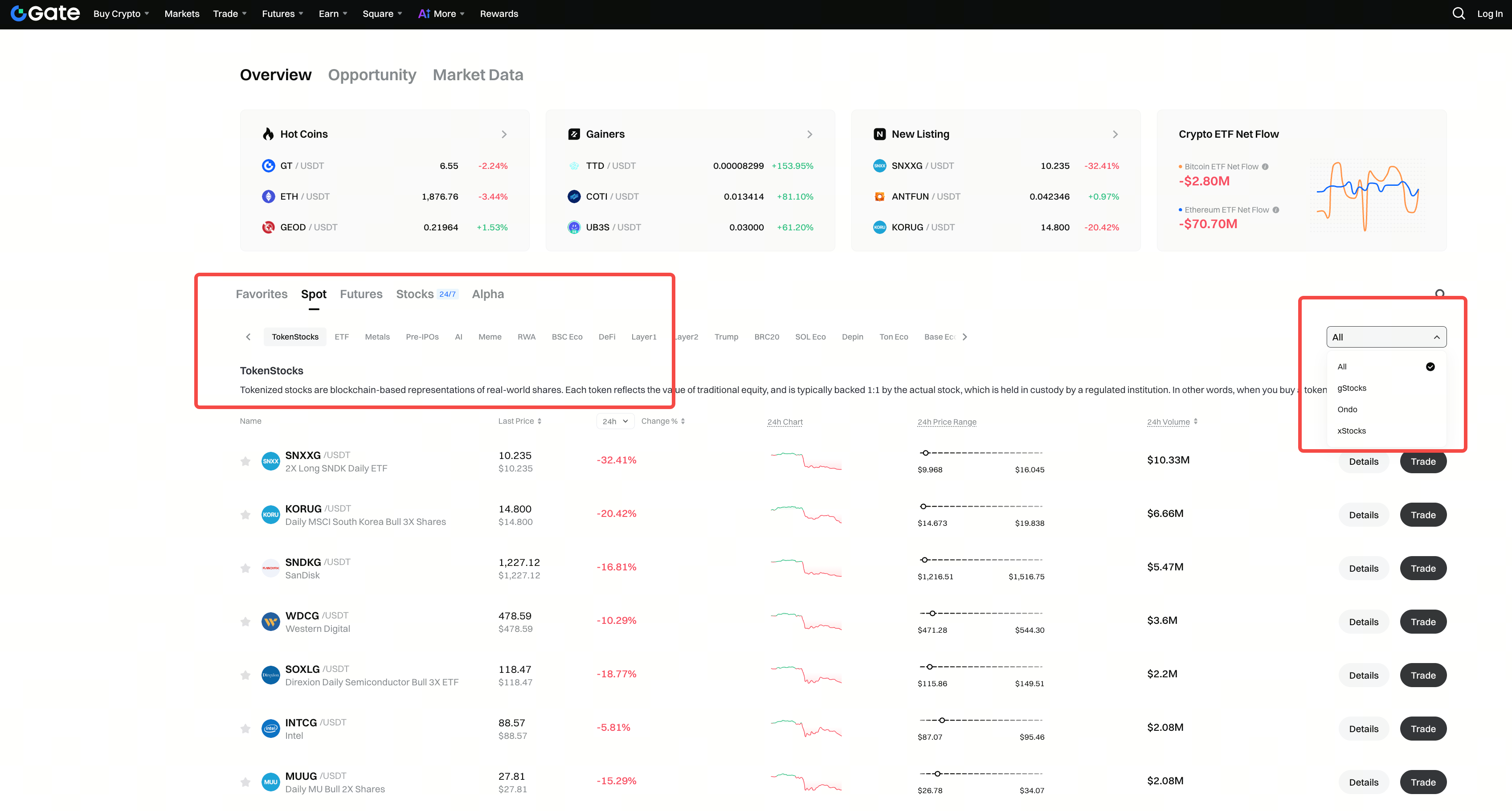
- App: open Spot → TokenStocks; web: select TokenStocks in Spot markets and open the TokenStocks market list
- Filter under All / gStocks / Ondo / xStocks (app top tabs; web right-side dropdown)
- Search the ticker; verify suffix (
G / ON / x) and underlying name
- Open Trade, choose buy or sell, and submit a limit or market order
- Track status in Open Orders, Trade History, and Assets
What Do You Need Before Trading TokenStocks?
Before using USDT to trade TokenStocks, confirm account status, identity verification level, spot trading permissions, available USDT balance, and whether the target symbol is tradable in your region. Live rules appear on the TokenStocks market list, the TokenStocks product page, and each trading screen.
Preparation separates three failure modes: seeing the list but unable to submit, insufficient USDT at order time, and buying the wrong product line because the Ticker suffix was not checked. Any unclear prep item can block submission or produce a fill that does not match the intended underlying.
| Preparation item |
What to verify |
Common impact |
| Account access |
Can open Spot / TokenStocks |
Blocks entry to the trading section |
| USDT balance |
Available USDT in spot wallet |
Limits size or prevents submission |
| Product line |
Ticker suffix G / ON / x matches intent |
Wrong line among gStocks, Ondo, xStocks |
| Underlying name |
Token name matches target equity or ETF |
Buys a similar but wrong code |
| Fee display |
Fee rate on the order panel |
Affects net fill cost |
| Session liquidity |
Regular, extended, or closed U.S. equity hours |
Wider spreads and tracking drift |
The prep table splits “can enter the section” from “can submit the correct order.” Account, funds, Ticker identification, and fee rules must be clear before search and placement.
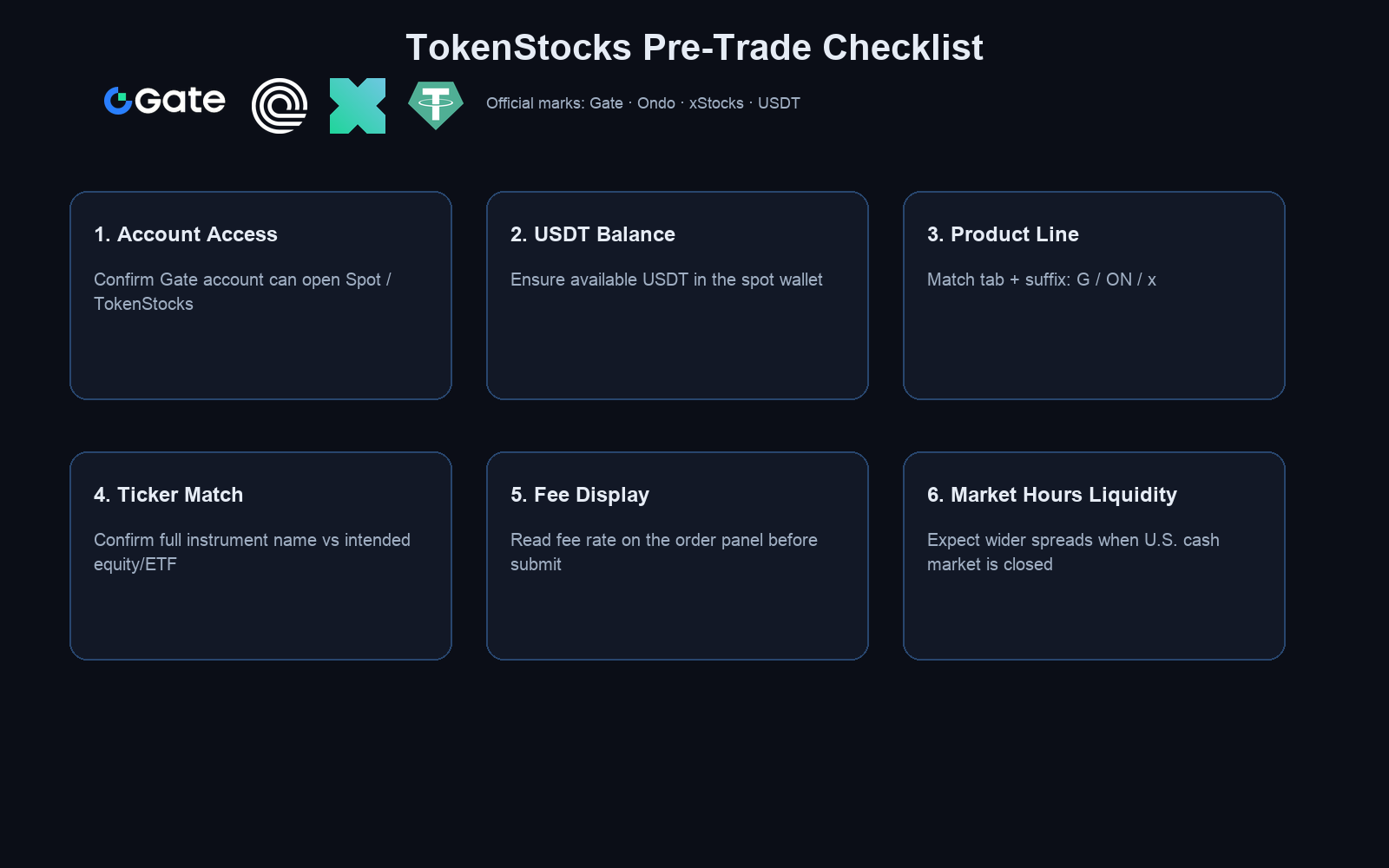
Figure 1. TokenStocks trading prep: account access, USDT balance, Ticker suffix, fees, and liquidity.
How Do You Prepare USDT for TokenStocks Trading?
TokenStocks spot pairs commonly use USDT as the quote asset. USDT must sit in spot available balance, not locked by open orders or held in accounts that cannot spot-trade. USDT can arrive via deposit, buy-crypto flows, or internal transfer; balances in other sub-accounts may not be spendable until moved to spot.
Before placing an order, read Available USDT on the order panel. Open limit orders freeze the quoted amount; USDT from sells usually returns to spot after settlement—confirm in trade history. Partial fills still consume balance according to platform rules shown on the page.
How Do You Find TokenStocks and Filter gStocks, Ondo, or xStocks?
App: Open Spot → TokenStocks. Top tabs usually include All / gStocks / Ondo / xStocks.
Web: In Spot markets, select the TokenStocks category and open the TokenStocks market list. Use the right-side dropdown for All / gStocks / Ondo / xStocks. List rows typically offer Details and Trade. You can also open related explainers from the TokenStocks product page.
gStocks Tickers often end with G, Ondo with ON, xStocks with x; the same underlying may list separately on each line, so filter and suffix must be checked together. For issuer and mechanism side-by-side, use the three-line tokenized stocks comparison.
| Filter |
Product line |
Typical Ticker clue |
Notes |
| gStocks |
Gate tokenized securities |
G suffix |
1:1 native stock reserve design |
| Ondo |
Ondo Stocks |
ON suffix |
Total-Return Tracker structure |
| xStocks |
Backed Finance ecosystem |
x suffix |
May also appear in other supported search entry points |
| All |
Combined list |
Suffix required |
Do not rely on name alone |
The filter table speeds product-line lookup but does not replace per-symbol checks. Locate Ondo names with the Ondo filter inside TokenStocks; mechanism notes are in Ondo spot trading basics. For gStocks-only prep, follow the gStocks trading flow.
How Do You Place a Buy or Sell Order?
On the target TokenStocks spot page, work through five checkpoints: confirm the USDT pair and side (buy/sell) → choose limit or market (limit waits at your price; market executes against available liquidity) → enter quantity; check minimum size and available USDT → re-verify Ticker suffix, underlying name, and estimated fee before submit → track the order in Open Orders, Trade History, and Assets.
TokenStocks track equity prices on-chain; they generally are not exchange-registered shares and typically carry no voting rights or cash dividends as direct stock would. Fees follow the token trading schedule on the order panel; both maker and taker sides use the displayed token fee rates.
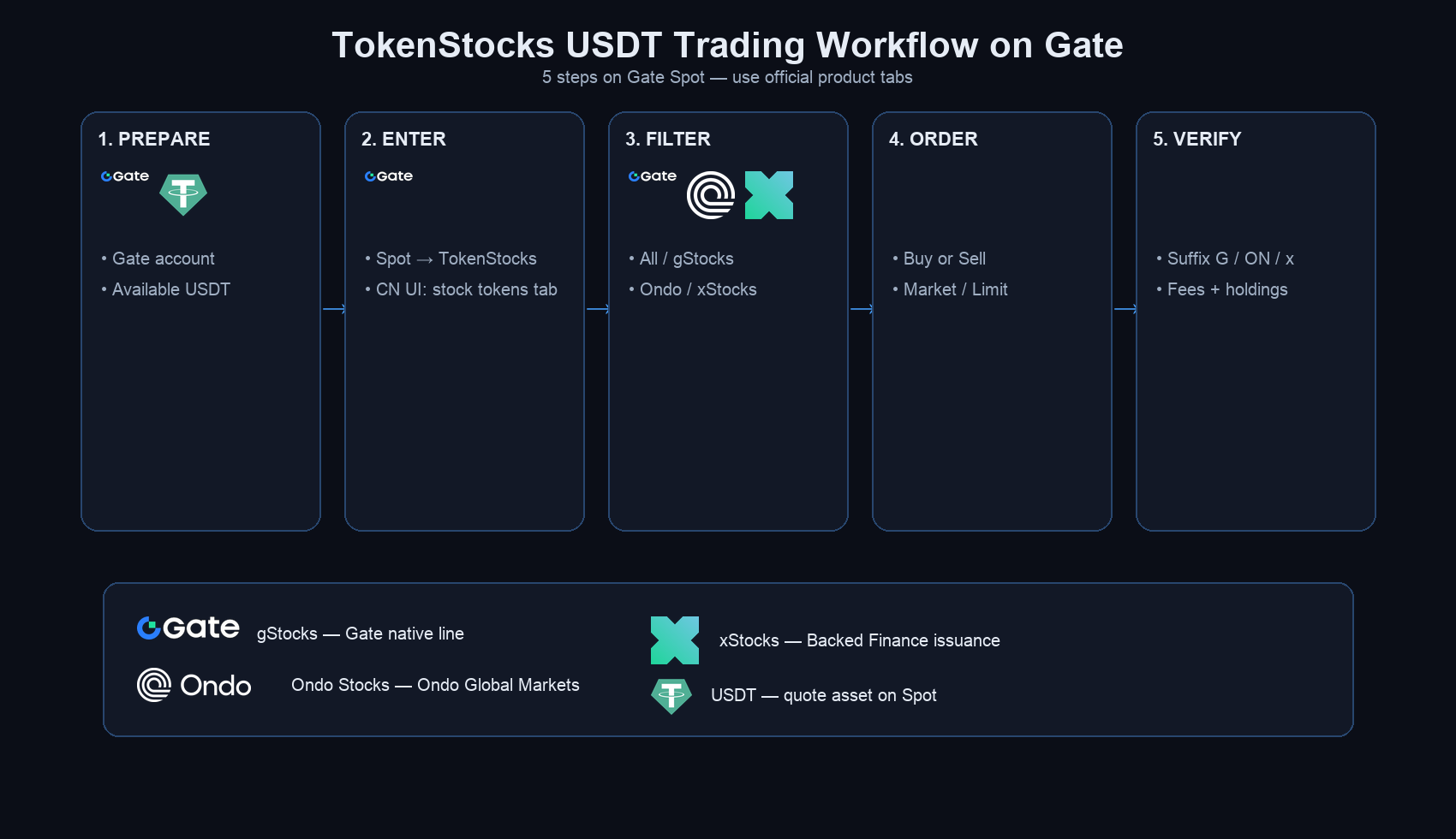
Figure 2. Five-step USDT TokenStocks flow: prepare, enter section, filter tabs, place order, verify.
What Are Common Errors When Trading TokenStocks?
Most mistakes come from Ticker confusion, misreading available balance, or underestimating off-hours liquidity. Use the table below for post-trade review.
| Error |
Cause |
Fix |
| Wrong product line purchased |
Suffix G / ON / x not checked, or similar Ticker picked from All |
Filter by tab, re-search; verify trade history before reversing |
| Order rejected |
Insufficient USDT, restricted permissions, or symbol temporarily unavailable |
Check spot available balance and product page status; complete required verification |
| Limit order unfilled |
Limit price far from market |
Adjust price or switch to market; review depth |
| Fill price far from expectation |
Market order in closed or thin hours |
Prefer higher-liquidity windows; use limit to cap price |
| Assumed direct share ownership |
Confused price-tracking token with registered stock |
TokenStocks usually lack vote and cash dividend rights |
| Ignored fees |
Did not read fee line on order panel |
Check estimated fee before submit; rely on live page display |
The error table supports self-review; persistent status issues should be traced in Open Orders and Trade History against platform records.
Is Trading TokenStocks with USDT Safe?
“Safe” here means understanding custody, tracking, and platform rules—not a guarantee of returns. Gate provides spot matching for tokenized instruments; users hold token balances, not broker street-name shares. Account security (strong password, two-factor authentication), verifying official app and web domains, and checking each order’s Ticker and suffix reduce operational risk.
TokenStocks differ from traditional brokerage accounts: no shareholder register, no standard proxy voting, and corporate actions follow issuer rules—not always one-for-one with U.S. listed shares. Treat TokenStocks as price-tracking crypto spot assets until issuer disclosures confirm otherwise for a specific symbol.
What Risks Should You Know Before Trading TokenStocks?
Three risk buckets matter before sizing an order. Tracking and liquidity: during U.S. market closures or low volume, spreads widen and on-chain prices may drift from the underlying. Rights and structure: TokenStocks generally are not direct shares—no voting, no cash dividends in the usual sense; Ondo total-return mechanics reinvest differently from cash payouts; splits follow issuer policy. Issuer events: issuer insolvency or default can break pegs or drain liquidity. Gate displays token trading; it does not act as a U.S. securities broker. Fees and symbol rules follow each live trading page.
Summary
USDT TokenStocks trading on Gate flows through account and USDT prep, App Spot → TokenStocks or the web TokenStocks market list, filtering All / gStocks / Ondo / xStocks, suffix-verified order entry, and post-fill fee and balance review. Product lines differ by issuer and mechanism; G, ON, and x suffixes are the primary identifiers.
TokenStocks offer on-chain price exposure and generally do not equal direct equity ownership. Session timing, liquidity, and issuer events all affect fill quality and tracking. Fees, symbol availability, and permissions follow the market list, product pages, and trading screens in real time.
FAQ
How do you buy TokenStocks with USDT on Gate?
Fund spot available USDT, open App Spot → TokenStocks or the web TokenStocks market list, filter All / gStocks / Ondo / xStocks, open Trade on the USDT pair, verify Ticker suffix and underlying name, choose buy, and submit limit or market. After fill, confirm quantity and fees in Assets and Trade History.
What are TokenStocks on Gate?
TokenStocks are Gate’s tokenized stock segment—on-chain instruments whose prices typically track U.S. equities and related products. Three lines exist: gStocks, Ondo Stocks, and xStocks. They trade against USDT in spot markets but generally are not registered shares and usually lack shareholder voting rights.
Can TokenStocks be traded 24/7?
Yes. Unlike conventional U.S. equity sessions, TokenStocks spot markets run continuously on Gate. During U.S. market closures or thin hours, tracking and spreads may be less stable; market orders carry extra slippage risk in those windows.
What are the main risks of trading tokenized stocks?
Key risks include price drift and wide spreads when underlying markets are closed or illiquid; absent vote and cash dividend rights versus direct shares; and issuer-side events that can impair pegs or liquidity. Fees and per-symbol rules appear on each trading page.
How do gStocks, Ondo, and xStocks differ?
gStocks use Gate’s 1:1 native stock reserve model with G suffixes. Ondo Stocks from Ondo Global Markets use a Total-Return Tracker with ON suffixes. xStocks from the Backed Finance ecosystem use x suffixes. Issuer, backing, and Gate entry points differ—verify suffix and tab before trading.
Is there a minimum USDT amount for TokenStocks?
Gate does not publish one universal USDT minimum for all TokenStocks. Trade size depends on spot available USDT, each symbol’s minimum order unit, order type, and price at submission. Check the live order panel for the specific Ticker.