How to Quickly Transfer Google Authenticator to a New Phone? Complete Step-by-Step Guide

Beginner
Quick Reads
Last Updated 2026-04-03 22:08:58
Reading Time: 1m
Worried about losing Google Authenticator when switching phones? This article provides a detailed step-by-step guide on how to quickly transfer the authenticator to a new device, ensuring your account remains safe and secure.

What is Google Authenticator?
Google Authenticator is a two-factor authentication (2FA) tool used to generate dynamic verification codes (TOTP). It can significantly enhance the security of accounts and is widely used for login protection on platforms such as email, exchanges, and social media.

Why transfer Authenticator to a new phone?

Many people forget to sync the authenticator when switching to a new phone, which can lead to being unable to log into their accounts. To prevent account lockout, we must complete the transfer of Google Authenticator while the old phone is still available.

Preparation work before transfer

Before you begin, please ensure:

  1. The old phone can still be used normally and can open the authenticator.
  2. The new phone has already downloaded and installed the Google Authenticator app (just search for “Google Authenticator” in the App Store or Google Play).
  3. Prepare the login information for your account, especially for platforms that have 2FA enabled (such as Gmail, Gate, Binance, etc.).

It is recommended to use screenshots or paper and pen to record account binding information for future reference.

How to transfer account in Google Authenticator

The steps are as follows:

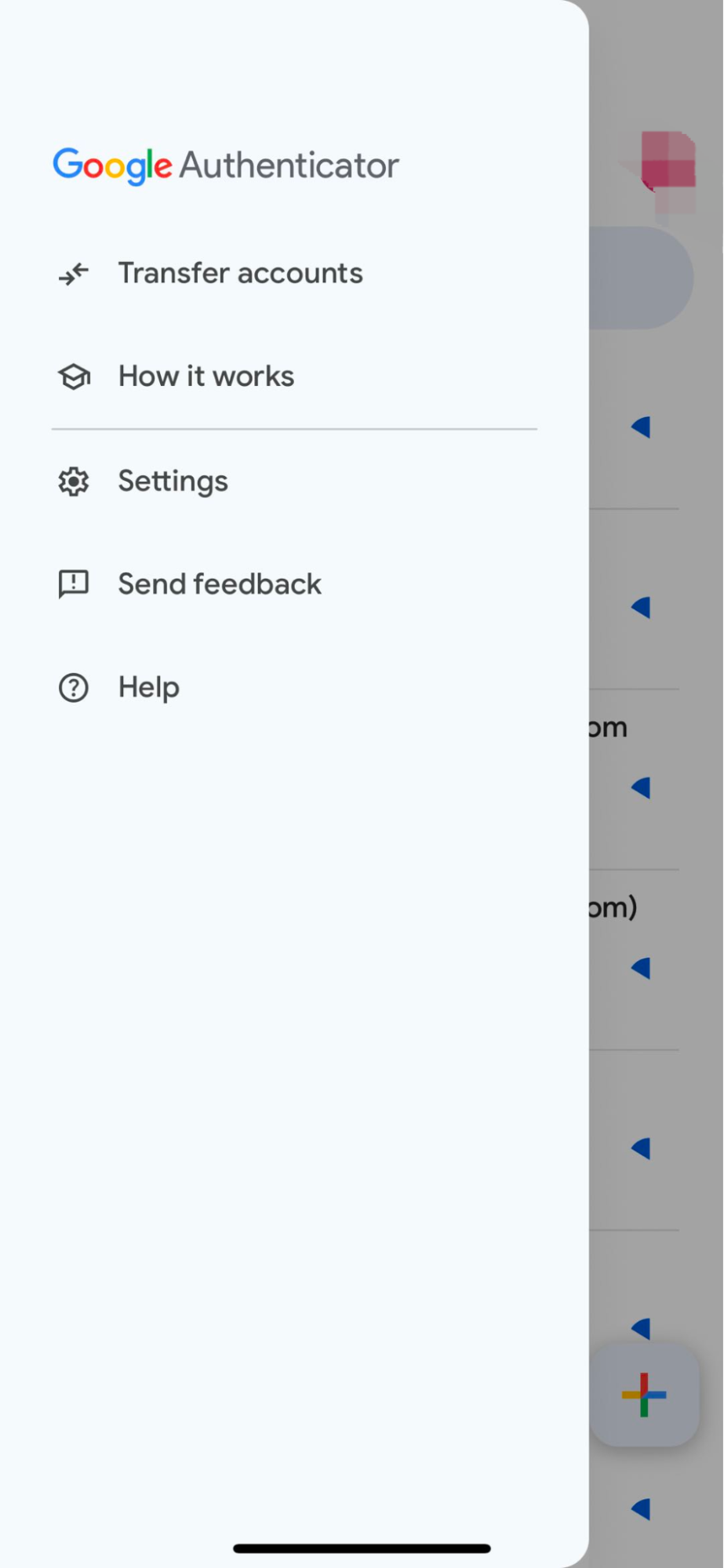
1. Open Google Authenticator on your old phone: Click the “menu” icon in the upper left corner (three lines), and select “Transfer accounts.”
2. Select “Export Account”: Choose the accounts you want to transfer based on the prompts (multiple selections are allowed), and then click “Next”.
3. The system will generate a QR code: This QR code contains the 2FA information for all selected accounts.
4. Open Google Authenticator on your new phone: Tap “Get Started,” then choose “Import from existing account” or “Scan QR Code.”
5. Scan the QR code on the old phone: After scanning is complete, the new phone will have completed the account transfer.
6. Confirm success: The verification code will appear immediately on the new device, and it is recommended to try logging into the bound service platform for testing right away.
7. Delete Authenticator data from the old phone (optional): Make sure the new phone is functioning properly before clearing the binding information on the old device.

Frequently Asked Questions and Precautions

  • What to do if an old phone is lost: It is recommended to quickly go through the platform’s “Account Recovery” process and provide identification to解除 2FA 绑定.
  • Does Google Authenticator have a backup feature: the new version supports cloud backup (requires linking a Google account) to prevent data loss.
  • Can it be used on multiple phones at the same time: In principle, sharing the Authenticator across multiple devices is not recommended, but it can technically be synchronized by scanning the same QR code.
Author: Max
Disclaimer
* The information is not intended to be and does not constitute financial advice or any other recommendation of any sort offered or endorsed by Gate.
* This article may not be reproduced, transmitted or copied without referencing Gate. Contravention is an infringement of Copyright Act and may be subject to legal action.

Related Articles

The ve(3,3) Flywheel Explained: How AERO Tokenomics Powers Aerodrome’s DeFi Economy
Beginner

The ve(3,3) Flywheel Explained: How AERO Tokenomics Powers Aerodrome’s DeFi Economy

In the competition for DeFi liquidity, high-inflation mining alone is no longer enough to build lasting advantages. Aerodrome applies the ve(3,3) economic model to redesign token emissions, voting mechanisms, and revenue distribution, creating a liquidity flywheel centered on governance and cash flow. This article examines AERO tokenomics, the veAERO locking mechanism, and protocol revenue models to explain how Aerodrome builds a sustainable DeFi economic system.
2026-03-25 06:41:58
AI-Native Settlement Layers: How United Stables Is Building the Next Financial Rail
Beginner

AI-Native Settlement Layers: How United Stables Is Building the Next Financial Rail

Stablecoins were originally designed as dollar substitutes within exchanges, primarily used for asset pricing and trade settlement. As on-chain financial ecosystems have matured, their role has expanded beyond simple payments to include collateral assets, cross-chain liquidity mediums, and unified settlement units. In particular, as AI systems and automated agents begin to participate directly in economic activity, demand has risen sharply for programmable value units capable of instant settlement. This shift is pushing stablecoins toward the role of foundational financial infrastructure.
2026-03-25 03:16:17
Aerodrome Tokenomics: How ve(3,3) Powers Base's Most Profitable DEX
Beginner

Aerodrome Tokenomics: How ve(3,3) Powers Base's Most Profitable DEX

AERO is the native token of Aerodrome Finance, a core decentralized exchange and liquidity protocol in the Base ecosystem. It is primarily used for liquidity incentives and ecosystem operations. veAERO is a governance NFT that users receive by locking AERO, representing both voting power and the right to share protocol revenue. Through a dual track structure of AERO as a utility token and veAERO as a governance credential, Aerodrome separates liquidity usage value from long term governance power, allowing participants to act as liquidity providers, governance decision makers, and revenue sharers within the same system.
2026-03-25 06:40:31
How Does PAXG Work? In-Depth Overview of the Physical Gold Tokenization Mechanism
Beginner

How Does PAXG Work? In-Depth Overview of the Physical Gold Tokenization Mechanism

PAXG (Pax Gold) is a tokenized asset backed by physical gold, issued by the fintech company Paxos and traded on the Ethereum blockchain as an ERC-20 token. The core concept is to tokenize physical gold on-chain, with each PAXG token representing ownership of a certain amount of gold. This structure enables investors to hold and trade gold in the form of a digital asset.
2026-03-24 19:12:51
How is the price of PAXG determined? Pegging mechanism, trading depth, and influencing factors
Beginner

How is the price of PAXG determined? Pegging mechanism, trading depth, and influencing factors

PAXG (Pax Gold) is a tokenized asset backed by physical gold reserves, launched by fintech firm Paxos and issued as an ERC-20 token on the Ethereum blockchain. The core concept is to digitally represent real-world gold assets, allowing investors to hold and trade gold via the blockchain network. Because each PAXG token corresponds to a specific quantity of physical gold, its price is theoretically expected to closely track the global gold market.
2026-03-24 19:11:40
DePIN Identity Network and Real World Applications: How Humanity Protocol Brings on-chain Identity Into the Physical World
Beginner

DePIN Identity Network and Real World Applications: How Humanity Protocol Brings on-chain Identity Into the Physical World

Most Web3 identity systems remain confined to on-chain environments and struggle to achieve meaningful adoption in real world settings. Through a DePIN architecture and physical verification hardware, Humanity Protocol aims to bring decentralized identity into access control systems, hospitality, public services, and offline events, allowing on-chain identity to function not just as a digital credential, but as foundational infrastructure for real world access.
2026-03-25 07:40:53